








Take Control of Your Engineering Data
Take Control of Your Engineering Data
SOLIDWORKS PDM helps teams quickly locate files with advanced search tools while maintaining secure access and reliable version control. Keep CAD models, documents, emails, images, and other project data organized in a centralized indexed vault hosted on your company server. Automated workflows and revision tracking ensure everyone works from the latest approved files, giving you complete control over your engineering data and document management processes.
SOLIDWORKS PDM helps teams quickly locate files with advanced search tools while maintaining secure access and reliable version control. Keep CAD models, documents, emails, images, and other project data organized in a centralized indexed vault hosted on your company server. Automated workflows and revision tracking ensure everyone works from the latest approved files, giving you complete control over your engineering data and document management processes.
Capabilities
SolidWorks PDM Standard
SolidWorks PDM Professional
SolidWorks Manage
Revision Control
Automated Neutral File Creation
Custom Configuration
Automated Data Handling
Serial Number Generators
Email Notifications
Item Management
Basic Approval Workflow
Automated Approval Workflow
Business Process Management
Secure Access
Audit Trail
Find and Reuse Design Data
Integrated Search
Advanced Search
eDrawing Previews
Multi Document View
Dashboards and Reports
Remote Access
Project Management
User Tools

SOLIDWORKS PDM Standard
Ideal for smaller businesses and single-site teams, SOLIDWORKS PDM Standard provides essential data management tools to organize, secure, and track engineering files with ease.
Key Features Include:
- Revision Tracking – Automatically monitor file changes, review revision history, and view updates directly within the task pane.
- Team Notifications – Keep team members informed with automated alerts for status updates and required actions.
- Automated PDF Generation – Automatically create PDF files from SOLIDWORKS drawings during workflow transitions.
- Integrated File Preview – Instantly preview CAD files and related documents using the built-in eDrawings viewing functionality.
SOLIDWORKS PDM Professional
Additional Features Include:
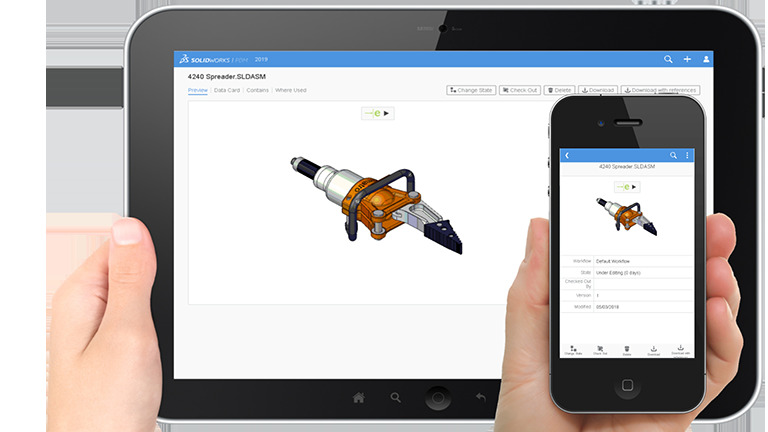
- Remote Access – Securely access files and project data through a web browser from virtually anywhere and on any device, supporting both internal and external users.
- Automated Email Notifications – Configure alerts to automatically notify users when files, folders, or workflow statuses are updated.
- BOM Management – Maintain and utilize Bill of Materials (BOM) data for manufacturing, purchasing, and other downstream processes.
- Multi-CAD Support – Connect and manage data from a variety of third-party CAD applications using built-in integration tools.

SOLIDWORKS Manage
SOLIDWORKS Manage is designed for organizations that require advanced, records-based data and process management. It expands on the capabilities of SOLIDWORKS PDM with powerful tools for project planning, process automation, and business intelligence.
Additional Features Include:
- Project Management – Plan, manage, and track projects from initiation through completion using tasks, timelines, and integrated timesheets to monitor progress automatically.
- Process Management – Streamline business operations by configuring workflows for Engineering Change Requests (ECRs), approvals, transmittals, and other critical processes.
- Item Management – Create, modify, and compare complete Bills of Materials (BOMs) using linked records and file data.
- Dashboards & Reporting – Build interactive dashboards and generate detailed reports to visualize key business metrics, with options to distribute reports automatically via email.